✓ fertig2026
Transcript Study — learn languages from YouTube
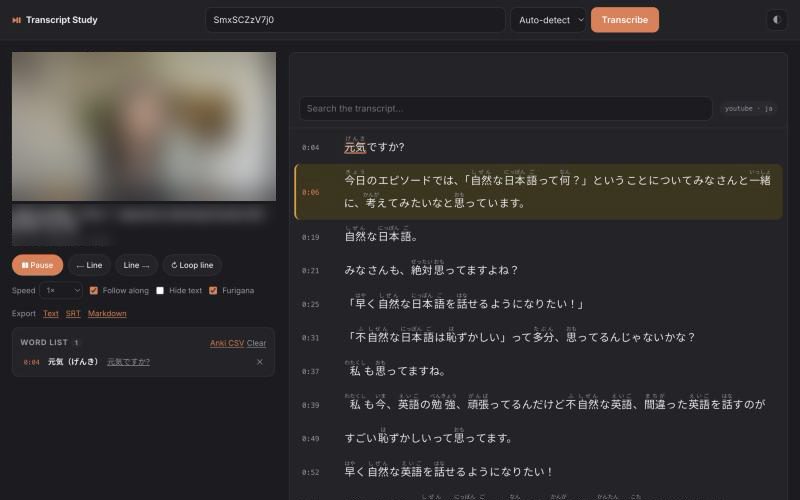
Paste a YouTube link and study from a time-synced transcript, with line looping, a listening mode that hides the text, click-to-save word lists exported to Anki, and furigana for Japanese. Runs locally, with offline Whisper when a video has no captions.
- Rolle
- Solo developer
- Stack
- Python · FastAPI · yt-dlp · faster-whisper · fugashi · JavaScript · Docker · Vercel
- Links
- github ↗
Problem
I learn English, German and Japanese from YouTube videos, but YouTube's caption view is no good for studying: you can't loop a sentence, save words with their context or see kanji readings.
Solution
- Real captions first. If a video has subtitles (the creator's own or YouTube's automatic ones), they're used, which takes a second or two.
- Offline speech-to-text as a fallback. Without captions, the audio is transcribed locally with Whisper, and nothing goes to a third party.
- Study view: the current line is highlighted and scrolls along with the video, clicking a line jumps there, R loops a single line and H hides the text for pure listening practice.
- Word list: click any word to save it with its sentence and timestamp, then export it as a CSV that drops straight into Anki (also as text, SRT or Markdown).
- Furigana: Japanese is split into real words, not characters, and every kanji gets its reading above it, which you can switch off to test yourself.
How
- A FastAPI backend with
yt-dlpfor captions and audio, faster-whisper for local transcription and fugashi + UniDic for Japanese word splitting and readings. The frontend is plain JavaScript. setup.sh/run.shfor a one-command local start. Whisper is optional (--with-whisper, about 300 MB plus a ~500 MB model).- Deployment lessons: on Vercel, the app switches to a single-request mode, because a serverless function freezes once it responds. A 24-minute Japanese video comes back tokenised with furigana in about 1.7 s. But YouTube blocks caption requests from datacenter IPs, so the tool is built to run at home. A Cloudflare tunnel (
share.sh) makes it reachable from a phone, and a Dockerfile is there for a self-hosted server.